by vellorecity | Nov 26, 2025 | How to apply, News
Service Code: COC-603 | Department: Greater Chennai Corporation
Purpose:
The Collection of Property Tax service enables property owners to pay their outstanding property tax through the e-District portal. This service is designed for:
– Property owners within Chennai Corporation limits
– Authorized representatives handling property tax payments
– Residential and commercial property owners
– Owners of both new and old property registrations
Required Information:
Mandatory Search Criteria (Choose One Option):
For New Property:
– Property Type: Select “New”
– Zone Number where property is located
– Division Code of the property area
– Bill Number of the property
– Sub Number of the property
For Old Property:
– Property Type: Select “Old”
– Old Property Tax Number
– Local Body selection
Special Requirements:
– Existing Property: Must be previously assessed for property tax
– Tax Assessment: System displays half-yearly arrears automatically
– Penalty Inclusion: May include penalty amounts for overdue payments
– Payment Flexibility: Can pay partial or full outstanding tax amount
– Operator Login: Service accessed through authorized operator login
Step-by-Step Payment Process:
1. Visit the Portal: Login to e-Sevai Tamil Nadu portal as Operator
2. Navigate to Service: Click on Services → Greater Chennai Corporation → COC-603 Collection of Property Tax
3. Select Property Type and Enter Details:
– Select Property Type (New or Old – Mandatory)
For New Property:
– Select Zone No. (Mandatory)
– Select Division Code (Mandatory)
– Enter Bill No. (Mandatory)
– Enter Sub No. (Mandatory)
For Old Property:
– Enter Old Property Tax Number (Mandatory)
– Select Local Body (Mandatory)
– Click Search
4. Review Tax Information: System displays:
– Owner Name and Address
– Half-Yearly Wise Arrears breakdown (shows 6-month periods)
– Penalty amounts (if applicable)
– Total Collection Amount (already paid)
– Total Demand Amount (total tax due)
– Total Payable Amount (outstanding balance)
5. Make Payment:
– Enter Amount To Be Paid (can be partial or full amount)
– Click Make Payment
6. Download Receipt: After successful payment:
– Click Get Receipt to download payment receipt<b
– Save/print the receipt for tax records</b
Alternative CSC Centre Method:
Property owners may also pay taxes through any Common Service Centre (CSC) where trained operators assist with:
– Property type selection and details verification
– Tax arrears calculation and explanation
– Penalty amount clarification
– Payment processing
– Receipt download and printing
After Payment:
– Instant Receipt: Payment receipt available immediately
– Digital Record: Tax payment recorded in corporation database
– Proof of Payment: Downloadable receipt serves as payment proof
– No Physical Visit: Entire process completed online
Important Notes:
– Property Type Selection: Must choose correct property type (New/Old) first
– Different Requirements: New and Old properties have different search criteria
– Arrears Display: System shows half-yearly arrears history automatically
– Penalty Charges: May include separate penalty amounts for overdue payments
– Flexible Payment: Can pay any amount towards outstanding tax arrears
– Receipt: Payment receipt is generated instantly after transaction
– Tax Compliance: Payment updates property tax compliance status
– Greater Chennai Corporation: Service limited to Chennai Corporation jurisdiction
– Existing Assessment Required: Only for previously assessed properties
– Half-Yearly System: Tax periods displayed as half-yearly cycles (e.g., 2015_2016_1, 2015_2016_2)
Apply Online: https://tnedistrict.tn.gov.in
Assistance: Visit your nearest e-Sevai / CSC Centre
This guide is based on the Tamil Nadu e-District User Manual (COC-603). Government of Tamil Nadu, 2016.
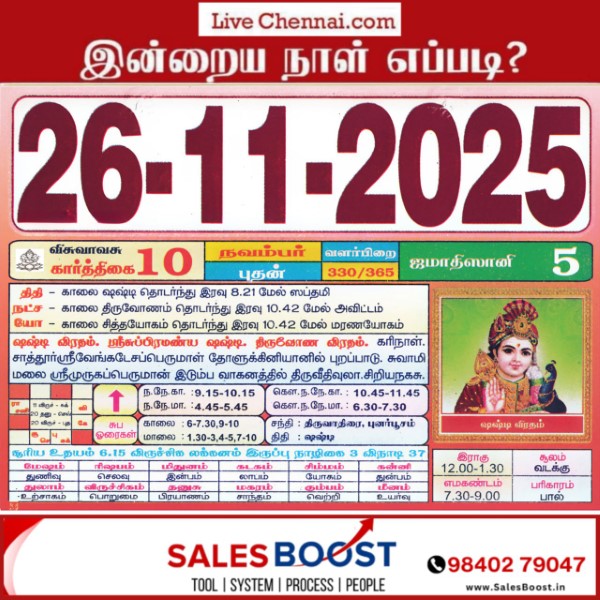
by vellorecity | Nov 26, 2025 | Auspicious day, News
| November 26, 2025 – Wednesday | Karthigai 10 | Visuvavasu Year |
| Auspicious Timings |
| Morning |
9:15 AM – 10:15 AM |
| Evening |
4:45 PM – 5:45 PM |
| Shubh Hora Timings |
| Morning |
6-7-30,09-10 AM |
| Evening |
01.30-3, 4-5,7-10 PM |
| Inauspicious Timings |
| Emakandam |
07:30AM – 09:00 AM |
| Gulikai |
10:30 AM – 12:00 PM |
| Rahu |
12:00 PM – 01:30 PM |
| Astrological Details |
| Thithi |
Shashti |
| Nakshatram |
Thiruvonam |
| Chandrashtamam |
Tiruvadhirai |
| Sulam |
North |
| Remedy |
Milk |

by vellorecity | Nov 25, 2025 | How to apply, News
Service Code: COC-602 | Department: Greater Chennai Corporation
Purpose:
The Collection of Professional Tax service enables professionals and businesses to pay their outstanding professional tax through the e-District portal. This service is designed for:
– Professionals and business entities liable for professional tax
– Employers responsible for deducting and remitting professional tax
– Authorized representatives handling tax compliance
– Entities registered within Greater Chennai Corporation limits
Required Information:
Mandatory Search Criteria:
– Zone Number where professional/business is registered
– Division Code of the business location
– Category of the professional/business
– Unique ID of the professional/business
Special Requirements:
– Existing Registration: Must be previously registered for professional tax
– Tax Assessment: System displays half-yearly arrears automatically
– Category Selection: Must select appropriate professional/business category
– Payment Flexibility: Can pay partial or full outstanding tax amount
– Operator Login: Service accessed through authorized operator login
Step-by-Step Payment Process:
1. Visit the Portal: Login to e-Sevai Tamil Nadu https://tnedistrict.tn.gov.in portal as Operator
2. Navigate to Service: Click on Services – Greater Chennai Corporation – COC-602 Collection of Professional Tax
3. Enter Professional Details:
– Select Zone No. (Mandatory)
– Select Division Code (Mandatory)
– Select Category (Mandatory)
– Enter Unique Id (Mandatory)
– Click Search
4. Review Tax Information: System displays:
– Company/Professional Name and Address
– Half-Yearly Wise Arrears breakdown (shows 6-month periods)
– Total Collection Amount (already paid)
– Total Demand Amount (total tax due)
– Total Payable Amount (outstanding balance)
5. Make Payment:
– Enter Amount To Be Paid (can be partial or full amount)
– Click Make Payment
6. Download Receipt: After successful payment:
– Click Get Receipt to download payment receipt
– Save/print the receipt for tax records
Alternative CSC Centre Method:
Professionals may also pay taxes through any Common Service Centre (CSC) where trained operators assist with:
– Professional details verification
– Tax arrears calculation and explanation
– Category selection guidance
– Payment processing
– Receipt download and printing
After Payment:
– Instant Receipt: Payment receipt available immediately
– Digital Record: Tax payment recorded in corporation database
– Proof of Paymyment: Downloadable receipt serves as payment proof
– No Physical Visit: Entire process completed online
Important Notes:
– Mandatory Fields: Zone No., Division Code, Category, and Unique Id are all required for search
– Category Selection: Must choose correct professional/business category
– Arrears Display: System shows half-yearly arrears history automatically
– Flexible Payment: Can pay any amount towards outstanding tax arrears
– Receipt: Payment receipt is generated instantly after transaction
– Tax Compliance: Payment updates professional tax compliance status
– Greater Chennai Corporation: Service limited to Chennai Corporation jurisdiction
– Existing Registration Required: Only for previously registered professionals/businesses
– Half-Yearly System: Tax periods displayed as half-yearly cycles (e.g., 2014_2015_2, 2015_2016_1)
Apply Online: https://tnedistrict.tn.gov.in
Assistance: Visit your nearest e-Sevai / CSC Centre
This guide is based on the Tamil Nadu e-District User Manual (COC-602). Government of Tamil Nadu, 2016.